Evernote and my plan for achieving “Inbox Zero”

Share

I have tens of thousands of emails in my Gmail inbox. At last count, 16, 503 are unread. I have over 50 labels set up. I don’t use any of them. It’s a mess

When I first learned about Inbox Zero I swooned. The idea is intoxicating. When your inbox is empty, you are no longer overwhelmed by email. You are in control. You enjoy a Zen-like feeling of tranquility. You process your email inbox once or twice a day, keeping it at zero. You have a “mind like water”.

I loved the idea, but the thought of going through tens of thousands of emails was about as appealing as a state bar complaint.

Email has long been the final frontier in my productivity makeover. I’ve resisted changing for a long time. But now, I have a plan.

My plan involves my favorite productivity tool, Evernote, which I use for collecting information and managing my projects and tasks. I use it all day long, in every part of my work flow, as my tool for Getting Things Done. Read my previous posts on how I use Evernote for getting things done.

Right now, when I get an email that requires action of any kind (a reply, a call, review, read, etc.) or that is related to a project I’m working on, or is something I want to keep for reference purposes (receipts, newsletter ideas, research, documents, etc.), or something I am waiting for, I forward that email to Evernote. I then tag it and incorporate it into my gtd system.

If an email requires a reply that will take no more than two minutes, I do it. I may also send a bcc to Evernote.

Sometimes, I get emails requiring action that I don’t send to Evernote. An example is an email I got recently from someone I hadn’t spoken to in a long time. I didn’t want to dash off a quick reply, I wanted to give it some thought. In this case, I added a @Reply label and archived the email in Gmail. When I’m ready to reply, the label will help  me find it.

Yes, I could also send these to Evernote, but I like having the orignial email connected to my reply. And, if I do send it to Evernote, I want to do so after I’ve replied, so I have both the original email and my reply in one Evernote note.

So, here’s my plan for achieving email bliss using Evernote and Gmail:

First, when I have some quiet time, (this will probably require several sessions), I will go through my Gmail inbox, scanning (not reading) and quickly doing the following:

  1. Unsubscribing from newsletters I don’t read.
  2. Adding @Reply label to anything I need to reply to that will take more than two minutes but does not need to be tracked.
  3. Sending Action and Reference items to Evernote.
  4. Trashing or archiving everything else.

Once my email inbox is empty, as new emails come in, I will review and process them, as follows.

  • If it requires a response or action that will take two minutes or less, I will do it, then Archive it; if I want to, I can also send a bcc to my Evernote account.
  • If it will take more than two minutes but I don’t need to keep notes, add it to a project, or track it, I will label it @Reply and do it as soon as possible.
  • If I’m waiting for a reply or for something to occur, I will send it to Evernote (and add a @Waiting tag).
  • If it’s something I want to keep for reference, an important email, an exemple of a good sales letter, a receipt, or something I want to read later, I will send it to Evernote.
  • All other emails will go into Archive or get trashed. At day’s end, I will again have an empty Inbox and an empty mind.

The premise behind all of this is to identify emails that need action. That’s key. Everything else is reference and can be found through search.

Note, I will use just one label in Gmail, @Reply. I am open to adding others down the road, but only if they truly serve me. For example, I may find it easier to label emails @Read/Review in Gmail, rather than sending them to Evernote for that purpose. I may also add labels for specific projects, or use them temporarily (e.g., for promotions). But for now, one label will do.

Wish me luck. I’ll let you know how it goes.

Have you achieved “Inbox Zero”? What do you think of my plan?
Share

[Book Review] Evernote: The Unofficial Guide To Capturing Everything And Getting Things Done

Share

If you’re a proponent of David Allen’s Getting Things Done (GTD) productivity system like I am, you’ve probably tried numerous ways to incorporate it into your work flow, from paper and file folders to web and mobile apps, and everything in between. Many of these are complicated, with lots of bells and whistles and a steep learning curve. Others, like plain paper or a Moleskine notebook are simple but for many of us, too limited.

Enter Evernote.

I’d been using Evernote for a long time, first for collecting information and ideas, eventually, for all of my documents. One day, I decided to see if I could also use it to manage my tasks and projects. Although Evernote isn’t designed as a task management application and it is limited in that realm, I found a way to make it work for me, and today I use it every day for exactly that purpose.

I like having one app for almost everything I do. I like having all of my notes and documents in the same place as my tasks and projects. It’s simple, reliable, and flexible and provides me with a complete system for managing my work and my life.

I went looking for others who use Evernote for Getting Things Done, and my search led me to fellow attorney and blogger, Dan Gold. Dan is a maven in the world of technology and productivity and has tried just about every productivity app under the sun. He used Evernote like I did, for collecting information, but was unable to find the right way to use it for GTD. In his quest to achieve a “mind like water,” he finally found the right combination.

The story of his journey is told in his newly published ebook, “Evernote: The Unofficial Guide To Capturing Everything And Getting Things Done,” (aff. link) now featured in Evernote’s Trunk (store). It’s a great read and provides a much needed lesson for using an extraordinary piece of technology in conjunction with a seminal productivity system, to manage your work and your life.

I read the book and found that to a great extent, Dan’s journey paralleled my own. We both liked the power and ubiquity of Evernote but were frustrated with its limitations as a productivity tool. After trying various apps and workarounds, we eventually found the solution.

In his book, Dan credits my blog post about how I use Evernote for GTD (and another blogger’s post on that subject) with providing some of the missing pieces in his set up. I appreciate his saying so but in reality, Dan had most of the pieces already in place. Like I had, he was adding elements–other apps that integrate with Evernote and a more complex arrangement of notebooks and tags. My post and the other blogger he credits simply showed him that Evernote didn’t need anything else, it could be used “as is” for GTD.

The key is not adding elements but subtracting them. Not using more notebooks to organize everything but fewer, and using enough tags, but not too many, to manage everything.

If you are a newcomer to Evernote or GTD, Dan’s book will sell you on why you need to be using them; it won’t tell you everything you need to know about how. What it will do is show you how you can use them together to create a complete system for getting things done.

“Evernote: The Unofficial Guide To Capturing Everything And Getting Things Done,” is a quick read and available for immediate download for just $5. Dan promises free updates and since Evernote is continually being developed, this makes a great value even greater.

Share

How to stay focused when you need to get things done

Share

You’ve got work to do, deadlines to meet, things that must get done, and you know you need to focus but it’s difficult because there are so many interruptions.

How do you cope?

“6 Ways to Minimize Interruptions When You Need to Focus,” offers some ideas:

  1. Close the door while you’re working
  2. Wear headphones to prevent colleagues chatting
  3. Say, “Could you come back in ten minutes?”
  4. Let your phone go to voice-mail
  5. Turn off Skype, Email, Facebook, Twitter, etc. . .
  6. Get into the office early

In short, these tips remind us to, “avoid outside stimuli”. That’s why we went to the library to study for exams, isn’t it?

Interruptions by others are easy to fix, if you want to. But do you really want to? I think we enjoy interruptions–we like the respite they provide from the tedium of our work.

I’ve found that when I really do need to shut off outside stimuli, because of a deadline, for example, I do it. The fear of loss of the looming deadline motivates me to do what we need to do–and I do it.

The greater challenge is not with outside stimuli or interruptions by others, it is with interruptions we impose on ourselves.

When we’re working, we’re also thinking about other things we have to do. Our neurons are firing, reminding us of promises unkept, other tasks that must get done, thinking about the game tonight, and imagining what will happen if we don’t meet our deadline. It is this internal chatter that is so hard to turn off.

So, how do you focus when your brain keeps interrupting you?

One way to do that is by removing all of those tasks and reminders from your brain and putting them into a “trusted system” to be processed and done at a later time. The term “trusted system” comes from the Getting Things Done™ (GTD) system which I’ve written about before.

Another technique for increasing focus is to give yourself short segments of time during which you are committed to working on the task at hand. Twenty-five minutes, fifteen, ten, or two, whatever you can handle. No matter how busy your brain may be, it can focus for two minutes. Once those two minutes are up, you are allowed to do something else or think about something else for, say, another two minutes. And then, you return to the work you were doing in the first segment, or onto something else.

It’s called, “The Pomodoro Technique.”

The most common implementation is a twenty-five minute block of time, followed by a five minute break. A timer is set, and when the bell sounds, you take your break. Kinda like prize-fighting. After the break, you return for the next round.

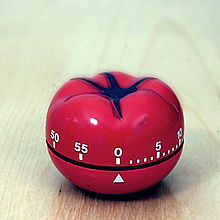
The technique was originally promoted via the use of a kitchen timer resembling a tomato (“pomodoro is Italian for tomato”) , like the one depicted above. I use something a bit more high tech.

On my PC’s desktop is an icon to launch an app that takes the place of a kitchen timer. There are many apps that do the same thing. The one I use is called, “Focus Booster,“ and it’s available for free for Mac and PC.

Give it a try. Start with a twenty-five minute pomodoro. When you’re done and you’ve taken a break, go for another. If you can’t stay focused for twenty-five minutes, start with ten. Or one.

Have you tried the Pomodoro Technique? How has it worked for you? Do you have a favorite app or do you use a kitchen timer?

Share

Working smart doesn’t mean sacrificing quality or personal attention

Share

I got an email from an attorney who read my story about the changes I made in my practice that increased my cash flow. (If you’re on my newsletter list, you have or will get the email, promoting my Cash Flow for Attorneys program). One of the things I did was delegate as much of my work as possible, eventually getting to the point where I did “only those things that only I could do.”

In reply, this attorney said,

“The lesson may be that sacrificing quality and personal attention to the clients can raise your bottom line. The moral should be: what client would pick that savvy business owner over the harder working practitioner?”

I understand how one might think that delegating as much as possible and running your practice like a business would lead to a lower level of quality or personal attention. In reality, it is just the opposite.

My clients got a higher level of service and more personal attention because I wasn’t trying to do everything myself. Think about it: attorneys works long hours and are stretched so thin they often don’t have time for lunch. They have less time for clients because they’ve got too many other things to do.

When you delegate work, it frees you up to do the things that really matter. You have time to greet new clients and introduce them to the staff who will take care of the mundane work. You have time and energy to oversee the important legal work, and to perform the work that “only you can do”. And you have time for marketing, so you can bring in more good clients, allowing you to hire more staff to better serve your growing practice.

If you’re trying to do too much yourself, you must find a way to delegate as much as possible. Continue to supervise your employees, to make sure the work is getting done and the clients are getting served, but let go of the notion that just because nobody can do it better than you means nobody but you should do it.

Do the math: you’re worth at least $300 an hour and, arguably, much more. If you continue to do $25 an hour clerical work, you’re working for your practice, not the other way around.

A law practice is first, a business. That business hires you, the professional. As the owner of that practice, you earn for what you do as a professional and you earn a profit on what your business takes in from paying clients. If your business doesn’t bring in clients, you won’t have anyone for whom to practice your profession.

I was a sole practitioner for my entire legal career, and I worked hard. Damn hard. Early on, I worked long hours and was always on the brink of exhaustion. I did my best to serve my clients but my best was limited to what I was able to give them with the limited time and energy at my disposal. It wasn’t until I starting working smart and delegated as much as possible that I was able to achieve the levels of financial success and time freedom I ultimately enjoyed. And because I was “selfish” enough to make that leap, my clients got better service than they ever got when I was doing almost everything myself.

Share

The best way to deal with things you don’t want to do

Share

In “6 Ways to Tackle Boring or Irritating Tasks,” the author presents common sense tips for handling unpleasant tasks. I use several of these tips myself. For example, when I have to make a call I don’t want to make, instead of thinking about it or putting it off (and thinking about it) I simply grab the phone and dial the number. By doing it as soon as possible I avoid unnecessary anxiety and I get the job done.

It’s like jumping into a cold swimming pool; the more you think about it, the more anxious you become. Dipping your toes in, trying to acclimate yourself to the change in temperature, often makes things worse (and makes you look like a sissy). Jump in and your anxiety and discomfort will soon be behind you (and you’ll look like a stud).

But while these tips are effective, I’ve found that often, the best way to deal with things you don’t want to do is to not do them at all.

You may disagree. You may believe that life is a series of unpleasant tasks and ignoring them means shirking responsibility, self-sabotage, or squandering opportunity. I’ll admit that this is sometimes true, but most of the time, it isn’t. Here’s why:

  • Not everything must be done. I find that not doing things rarely leads to permanent and serious harm or the loss of significant opportunity. The 80/20 principle tells us that “most things don’t matter” (the “trivial many”) and by not doing them, we free ourselves to focus on the “precious few” that do.Ask yourself, “what’s the worst that could happen if this doesn’t get done?” Most of the time the answer will be “not that much” and you can safely cross it off your list.
  • Not everything that must be done must be done by you. Just because something needs to be done doesn’t mean you are the one who must do it. Have an employee do it. Or an outside contractor. Or your partner. Whenever possible, do what you are best at and want to do and delegate everything else.
  • If it must be done and it must be done by you, it doesn’t always have to be done immediately. How many times have you put something on your task list only to find that out later that it no longer needs to be done? The problem worked itself out, someone else took care of it, or it really wasn’t as important as you previously thought. I find that happening to me all the time. Therefore, by not doing some things immediately, by intentionally procrastinating on things I don’t want to do, I safely eliminate many unpleasant tasks.
  • Not everything that must be done, by you, and immediately, must be done completely. The 80/20 principle also tells us that 80 percent of the value of a project, for example, comes from 20% of the tasks that comprise it. Therefore, when you have to do something you don’t want to do, look for ways to curtail it. Do only what is essential and of high value and avoid the rest.

There will always be unpleasant tasks in our lives we must do. A eulogy for a loved one, confronting a child who is going down the wrong path, or creating a household budget to drastically reduce expenses come to mind. But most tasks don’t fall into that category and can be avoided, delegated, deferred or reduced in scope.

The negative feeling you get when facing an unpleasant task are there for a reason. Your aversion to doing something is your subconscious mind (higher self, God, instincts, etc.) trying to protect you.

If you’re staring down a lion and facing death, don’t ignore your fear, run. Do it immediately and as completely as you can. But if you have a call to make, perhaps to a client who is behind in payment, and you don’t want to do it, you don’t have to “feel the fear and do it anyway”. Feel the fear and have your secretary do it.

Share

David Allen on how to handle distractions

Share

I thought you’d enjoy this short video by David Allen, the “Getting Things Done” guy himself.

[mc src=”http://www.youtube.com/watch?v=FTTQfeMGbd4&feature=player_embedded#!” type=”youtube”]David Allen on how to handle interruptions[/mc]

Share

How to read more and get more out of what you read

Share

Attorneys read a lot. Still, there’s always more we want to read, if only we had the time.

I was reading an article, yesterday, “7  Tips for becoming well-read,” and it has some good tips for reading more, things like starting small (e.g., 15 minutes during lunch) and minimizing distractions. But I didn’t think the tips went far enough so I came up with my own:

  • Be ruthless in what you select to read. Spend a few minutes with a book candidate and decide whether or not it is worth your time. Read reviews, the book’s cover, excerpts, and ask the person who recommended it. A few minutes spent in this process could save you hours of wasted time.
  • Skim. You don’t have to read the entire book, cover to cover. The 80/20 principle tells us that 80% of the value of a book is contained in 20% of its content so look for that.
  • You don’t have to finish it. If you don’t like it, stop reading it. Don’t waste time on books that don’t resonate with you.
  • Learn to speed read. Why spend five hours reading something you could read in 30 minutes?
  • Subscribe to book summaries services. Their editors summarize the books for you. For most books, that’s all you’ll need but if you like what you see in the summary, you can put that book on your list to read in its entirety.
  • Delegate. An employee can read for you, present a summary, and/or bring to your attention those books or articles he thinks you would want to read.

This will allow you to read more by eliminating a lot of marginal choices. You’ll have more time to read the “best of the best”. When you do, here’s how to get more out of what read:

  • If a book is truly high value, you may want to read it more than once. When I was in high school, I read, “How to Read a Book,” by Mortimer Adler. He presents a process for reading a book several times, each time with a different purpose. I don’t think every book qualifies for several readings but when you find one that does, a second or third reading could have immeasurable value.
  • Highlight. If you think you might read the book again, highlighting passages will make the second reading faster because you can, if you choose, read only the highlighted passages. (If you don’t think you will read the book again, or use it as a reference, there’s not much point in highlighting). For the record, I use a yellow highlighter on my first read and, usually, a red or blue pen on the second read.
  • Take notes. You’ll learn more about what you’re reading if you think about the words while you are reading them. Put the ideas in context, ask yourself questions, speculate on the options, and write it all down. It takes longer but you’ll get more value out of what you read. You’ll remember it better, too.
  • Read (and take notes) as though you had to teach the subject tomorrow. This will force you to zero in on the essence of the material, and master it.

So those are my tips for reading more and getting more out of what you read. By the way, none of this applies to fiction. We read fiction to escape, to learn about exotic places, to solve a mystery, to feel emotions, to have fun, or to learn about the human condition. Not something you want to speed up or delegate.

Share

“What can I do in the next two minutes to grow my law practice?”

Share

I know, you’re busy. I also know you have lots of ideas for getting more clients and increasing your income that you aren’t doing. You’re so busy with work, there’s no time for anything else. But actually, there is.

It’s called, ‘marketing in the moment”.

It doesn’t require you to set aside a half day, a weekend, or even an hour to work on marketing projects. Marketing in the moment means taking advantage of the little snippets of time we all have throughout the day to do the “little things” that, in the aggregate, help your practice grow.

The idea is simple (as all great ideas are). Throughout the day, as often as you can, ask yourself, “What can I do in the next two minutes to grow my practice?”

There are lots of things you can do in two minutes. You can

  • Call a client to ask if he knows about your new Facebook fan page
  • Send an email to a prospective referral source
  • Review your notes for your upcoming speech
  • Jot down some thoughts for an article
  • Brainstorm ideas for a new report or seminar
  • Write a list of new key words for your web site
  • Check in with someone who’s working on a project for you
  • Check out a competitors web site
  • Read the comments on a book you’ve been thinking about ordering
  • Read another article on this blog

Periodically throughout your day, between phone calls, while you’re driving, while you’re eating lunch, or whenever you think about it, pause and ask yourself, “What can I do in the next two minutes to grow my practice?” (You may want to write the question on a sticky note or index card and put it where you can see it.)

You’re asking your subconscious mind, of course, and it won’t disappoint you. While you’ve been working and sleeping and doing all the things you do, your subconscious mind has been working on your ideas and coming up with new ones, and, because you asked, it will deliver those ideas to you in bite-sized, two minute chunks.

You’ll remember people you may not have thought about and you’ll call them or email them. You’ll open your bookmarks and see a web site you’ve been meaning to look at. You’ll jot down ideas for your newsletter or blog. You’ll do a lot of things you may never have done had you not asked that question.

Try it. Ask yourself that question right now. Then go do it.

Share

Seven steps to better delegating for overworked attorneys

Share

Attorneys, especially sole practitioners, are often poor at delegating. “Nobody can do it as well as I can,” they say, and that’s not ego talking, it’s usually true.

There is risk in giving a task to someone who might not do it as well as you or might not get it done on time, but delegating is essential to the growth of a law practice. Delegating gives you leverage and leverage helps you to earn more and work less.

To get better results when you delegate, follow these seven steps:

  1. Give specific instructions. Describe what you want done in sufficient detail, in writing if possible. If instructions are given orally, ask them to be repeated back to you. Tell them to ask questions if they don’t understand.
  2. Give objectives, not procedures. Tell them what you want done, not how. If you’ve chosen the right person for the job, trust them to get the job done. Guide them, don’t micro-manage them.
  3. Tell them why. They’ll do a better job when they are invested in the outcome instead of just carrying out orders so explain why the task is important. And, if you give them more than one task at a time, tell them the relative importance of each.
  4. Give a due date (and time). Due dates help them to know what is expected and allow them to prioritize their work flow.
  5. Equip and empower them. Make sure they have what they need to get the job done–tools, a budget, assistance–and the authority to decide what to do. Don’t make them come back to you with every little decision.
  6. Offer incentives. If you have an especially valuable project, you might want to offer something for getting it done early or with a better outcome. A day off, dinner for two for them and their spouse, a cash bonus, all work well.
  7. Give praise. When they do a good job, thank them (even though they were doing their job) and praise them. Let them know you are pleased and they’ll want to do a good job for you next time.
Share